auviaGateway
Routing and LCR

SMS routing software that protects margin and delivery

Decide where each message goes with rules you can read, pick the supplier inside a pool by cost, weight, split or quality, and check the result before you switch it on.
First-match rulesLCR poolsPercentage splitReroute on errorMargin guards
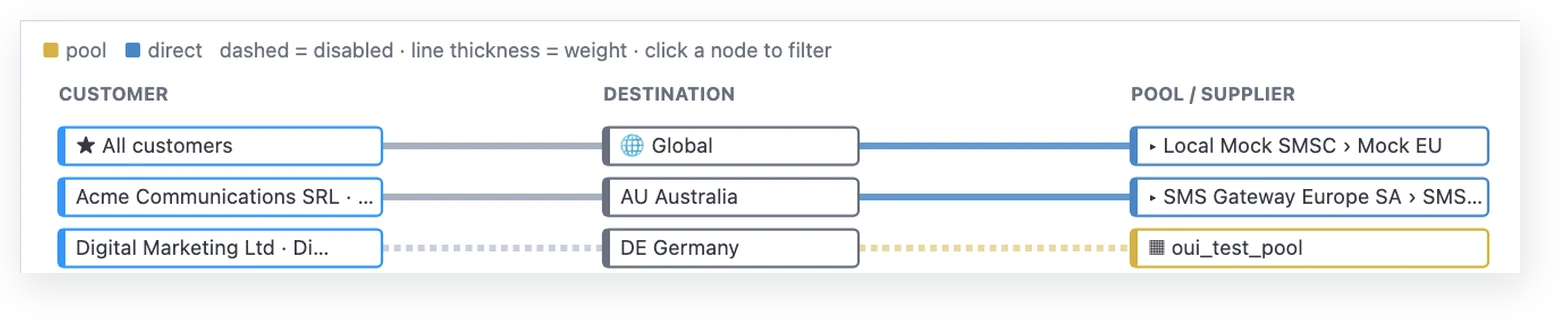
Smart Routing flow view from customer to destination to supplier
How a route is chosen
Route selectionA message to Italy with two parts matches the first rule that fits, priority 80, which points to pool IT-LCR. The pool is in least-cost mode, so the member with the lowest buy price for the destination is selected. Guards check margin, quotas, time windows and loops before sending. 1 · FIRST MATCHING RULE2 · POOL MODE3 · SUPPLIER MessageIT · 222/10GSM-7 · 2 partscustomer Acme P90 Acme ∧ sender ^OTP→ pool IT-OTPP80 country = IT ∧ parts ≤ 2→ pool IT-LCR matchedP10 country = IT→ trunk it-bulk-01 pool IT-LCR least costweightpercentage splitquality (DLR %) it-otp-02€0.0310 · selectedit-direct-01€0.0335eu-hub-03€0.0362 Guards before send: minimum margin · quotas · time windows · loop detection · then Routing Logic on SMPP traffic
Illustrative rules, pool and prices.Changes reach live traffic within seconds.
How a route is chosen

Two decisions, both under your control

StepWhat happensYou configure
1. Match a ruleRules are checked by priority. The first one that matches customer, country, MCC/MNC, network, prefix, sender, encoding, length or parts wins.Global or per-customer rules in the visual editor
2. Pick a supplierInside the rule's pool, the member is chosen by least cost, weight, percentage split or best delivery rate.Pool members, mode, priority and weights
3. Check guardsMinimum margin, quotas, time windows and loop detection can skip a route before sending.Guards per route or customer
4. Apply Routing LogicOn SMPP traffic, block, reroute, reduce parts or simulate a receipt, also on HLR status or portability.Routing Logic rules
5. Handle the outcomeOn an error, the registry decides between retransmission, reroute or final failure, up to 6 sends.Error code registry and failure rules
Capabilities

Built for traders who watch every route

Least-cost pools

Per message, the cheapest member for the destination wins, using operator, network or country price and stored FX rates.

Split and quality

Percentage split across suppliers, or best delivery rate over recent hours.

Routing scripts

A routing language for selection logic that rules cannot express, with preview and execution trace.

Routing products

Reusable bundles of prices and routes applied to a customer in one step.

Route quality guard

Switches a route off and alerts you when its undelivered rate crosses a threshold.

MNP-aware routing

Ported numbers routed and priced to the real operator when lookup is on.

Routing Analyser

See the decision before traffic does

Enter a number, an account and a text: the Routing Analyser runs the same rules and scripts as live traffic and shows the route, supplier, customer price, supplier price and margin. Coverage checks run across up to 500 destinations at once.

  • No message is queued or sent
  • Shows blocked, no route or insufficient balance outcomes
  • Coverage check across many destinations
Smart Routing routes list with destination, customer, supplier, weight and priority
FAQ

Questions buyers ask

Does it do least-cost routing?
Yes, inside a pool. Put the suppliers for a destination into one pool in least-cost mode and each message goes to the member with the lowest buy price for that destination, with priority and weight as tie-breaks.
How do I test a routing rule before activating it?
With the Routing Analyser. Enter customer, number and text, and it shows route, supplier, price and margin using the same rules and scripts as live traffic, without sending anything. To test delivery on real handsets, use route testing through TelQ.
What happens when a supplier rejects a message?
Supplier error codes go through one registry. Depending on the code, the message is retransmitted later, rerouted to another route or supplier, or closed. A message is sent at most 6 times in total.
Do routing changes need a restart?
No. Rule, pool and price changes reach live traffic within seconds.
Can I route ported numbers correctly?
Yes. With HLR/MNP lookup enabled for a destination, the message is routed and priced on the operator the number actually belongs to.
Talk to us

Let’s talk about your traffic.

Tell us your business type, the protocols towards customers and suppliers, cloud or on-premise, and the capabilities you care about. Our team comes back with a demo on the console or a technical evaluation on your scenario.

+971 58 513 4804sales@auviagateway.com